 SkinStratos
Frequently asked questions
Premium and billing, scanning, flags, your data and who we are. Can’t find your answer? Write to us; a real person replies.
Premium & billing
What do I get for free?
Every account gets five free product checks, with all flags and modes. Products you’ve already checked stay free to re-check, and similar products without the flags are shown to everyone.
How much does Premium cost?
At launch in Romania, 79.99 lei a year (about 6.67 lei a month) or 24.99 lei a month, and the yearly plan starts with a 14-day free trial. In the US it’s $19.99 a year or $5.99 a month. In other countries, Google Play and the App Store set the price for your country and show it to you before you subscribe. Prices include VAT.
Launch price: If you start a yearly subscription (including its free trial) on or before 31 March 2027, you keep the yearly launch price for as long as that subscription keeps renewing without a break, even after the price for new subscribers goes up (to 119.99 lei in Romania). It ends if you cancel and the subscription lapses, switch to the monthly plan, or subscribe again through a different store. Taxes set by law, such as VAT, may still change the amount you pay.
Premium gives you unlimited barcode checks + 15 label photos a day (barcode scans don’t count towards the photo limit), plus four tools: your avoid list, common ingredients, family profiles and opened-product reminders.
How do I cancel Premium or the free trial?
Google Play or the App Store bills the subscription, so you cancel it there:
- Android: open Google Play subscriptions, choose SkinStratos, then Cancel.
- iPhone: open Settings, tap your name, then Subscriptions, SkinStratos, Cancel Subscription.
Cancel at least 24 hours before the trial ends and you won’t be charged. After cancelling, you keep Premium until the end of the period you paid for. Deleting the app or your account doesn’t cancel the subscription.
I want a refund. How do I get one?
You can withdraw from Premium within 14 days of buying it, without giving a reason. For the yearly plan, the 14 days start when the free trial starts. Premium starts as soon as you subscribe, so if you withdraw after paying, you get back what you paid minus the days you already used. Nothing is deducted for a free trial. After the 14 days there’s no withdrawal refund; cancelling then only stops the next renewal.
To withdraw, write to support@skinstratos.com (the form in our Terms is optional) and request the refund from the store you paid: Google Play through your order history (we can also refund part of a Google Play payment ourselves), Apple through reportaproblem.apple.com.
I paid, but the app still shows the paywall
Give it a minute, then tap Restore purchases on the Premium screen. Make sure you’re signed in to the same Google or Apple account you paid with. Still stuck? Email us your order number from the store’s receipt.
Does Premium move with me to a new phone?
Yes. Your account is saved with the email you confirmed before your first check. On the new phone, sign in with the same email and the 6-digit code we send you. Your scans, settings and Premium come with you. Moving between Android and iPhone? Write to us and we’ll help.
Scanning
How does a scan work?
Point the camera at the barcode. If we know the product, its ingredient list appears straight away. If we don’t, photograph the ingredient list on the pack and SkinStratos reads it for you. You check the list, fix anything we misread, and then every ingredient is compared with the official lists.
The app read the label wrong
You can fix any ingredient before the check runs: tap Edit list. For a better photo, hold the phone flat over the list in good light and fill the frame with the text. Curved tubes and shiny bottles are harder to read; turn the product so the text faces the camera.
My product’s barcode isn’t found
Photograph its ingredient list instead. Once you’ve confirmed the list, it’s saved for that product, so your next scan of the same barcode is instant. When another person, independently, confirms exactly the same list for that product, it may also be offered to others who scan it (never with your name or email), and they still check it against their own pack.
What happens to my label photos?
The photo is sent securely to our server and to OpenAI, which reads the text. We don’t store the photo; only the ingredient list you confirm is saved. Please photograph only the ingredient list. Details are in our Privacy Policy.
I’ve used today’s label photos
Premium includes up to 15 label photos a day, to keep the service fair and affordable. The limit counts the last 24 hours, so each photo becomes available again 24 hours after you took it. Barcode scans of known products still work.
Flags & sources
What do red flag, watch and note mean?
- Red flag: banned in EU cosmetics, or a known or presumed carcinogen in the form used.
- Watch: on an official list but allowed within limits. Worth knowing, especially in products you leave on your skin.
- Note: only a concern in certain forms or amounts. We explain when.
Is a flagged product dangerous?
Not necessarily. A flag means the ingredient appears on an official list. Whether it matters depends on the form, the amount and how you use the product, for example whether you rinse it off. Each flag explains this and links to its source. SkinStratos gives information, not medical advice; if you’re pregnant or have a skin condition, ask your doctor or pharmacist.
Why is there no safety score?
A single number can’t tell you whether a product is right for you. We’d rather show you exactly what each official list says, so you can decide.
Where does the data come from?
- The EU Cosmetics Regulation annexes, through the EU’s CosIng database
- EU rules on fragrance allergens (Regulation 2023/1545)
- The US National Toxicology Program’s Report on Carcinogens
- California’s Proposition 65 list (OEHHA)
- Product names and barcodes from Open Beauty Facts
SkinStratos isn’t affiliated with or endorsed by these organisations.
I think a flag is wrong
Tell us at support@skinstratos.com with the product and the ingredient. We check every report against the source list and correct the data for everyone if we got it wrong.
Premium tools
What is the avoid list?
A list of ingredients you react to, for example from a dermatologist’s patch test. Add single ingredients, or whole groups such as parabens, isothiazolinones, formaldehyde releasers, sulfate cleansers, fragrance or lanolin. Every product you check then shows a red card if it contains one, even when the label uses another name (“Parfum” and “Fragrance” count as the same).
A product with no match can still contain something you react to under a name we don’t recognise, so keep checking the label if your reactions are severe.
How does “Common ingredients” work?
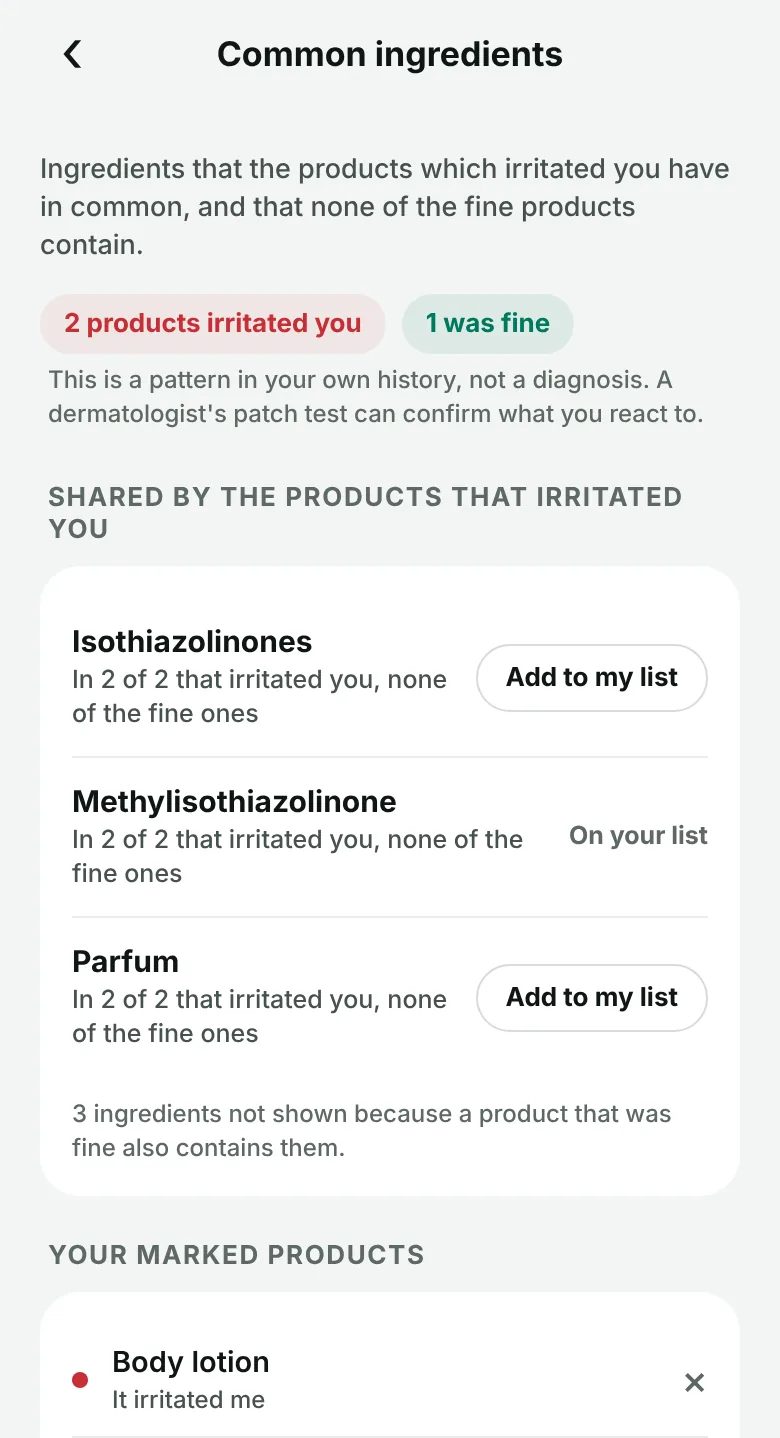
On a product’s result, tell us whether it irritated you or was fine. Once you’ve marked at least two products that irritated you and one that was fine, “Common ingredients” lists the ingredients the irritating products share that none of the fine ones contain. The more products you mark, the clearer the picture.
It’s a pattern in your own history, not a diagnosis. A dermatologist’s patch test can confirm what you react to.
What are family profiles?
Add up to five people you buy for, such as your partner. Choose who you’re checking for on the home screen; their results show the standard flags. Pregnancy and allergy modes, the avoid list and reaction marks are only for your own profile, because they are that person’s health information.
How do opened-product reminders work?
On a product’s result, tap “Mark as opened”, choose when you opened it and its period after opening: the number on the open-jar symbol on the pack, such as 12M. The app shows the use-by date and, if you allow notifications, reminds you a week before it. Your opened products are listed on the home screen, soonest first.
Is my avoid list private?
Yes. Your avoid list, reaction marks and family profiles belong to your account only. Nobody else sees them, and they’re never added up across users. Because they can reveal health information, we save them only with your explicit consent, and you can delete them, or withdraw consent and delete everything, at any time in the app. Details are in section 3 of the privacy policy.
Modes & UV index
What does pregnancy mode do?
It adds flags for ingredients linked to harm to the unborn child or to fertility, such as retinoids and some phthalates. Because this tells us something about your health, we only save the setting with your explicit consent, and you can switch it off and delete it at any time.
What does allergy mode do?
It flags the 80+ fragrance allergens EU law requires on labels, plus well-known preservative and hair-dye allergens. It can’t know your personal allergies, so it doesn’t replace a patch test or your dermatologist’s advice. Because an allergy is health information too, the app asks for your explicit consent before switching it on, and switching it off withdraws it.
What does the UV index show?
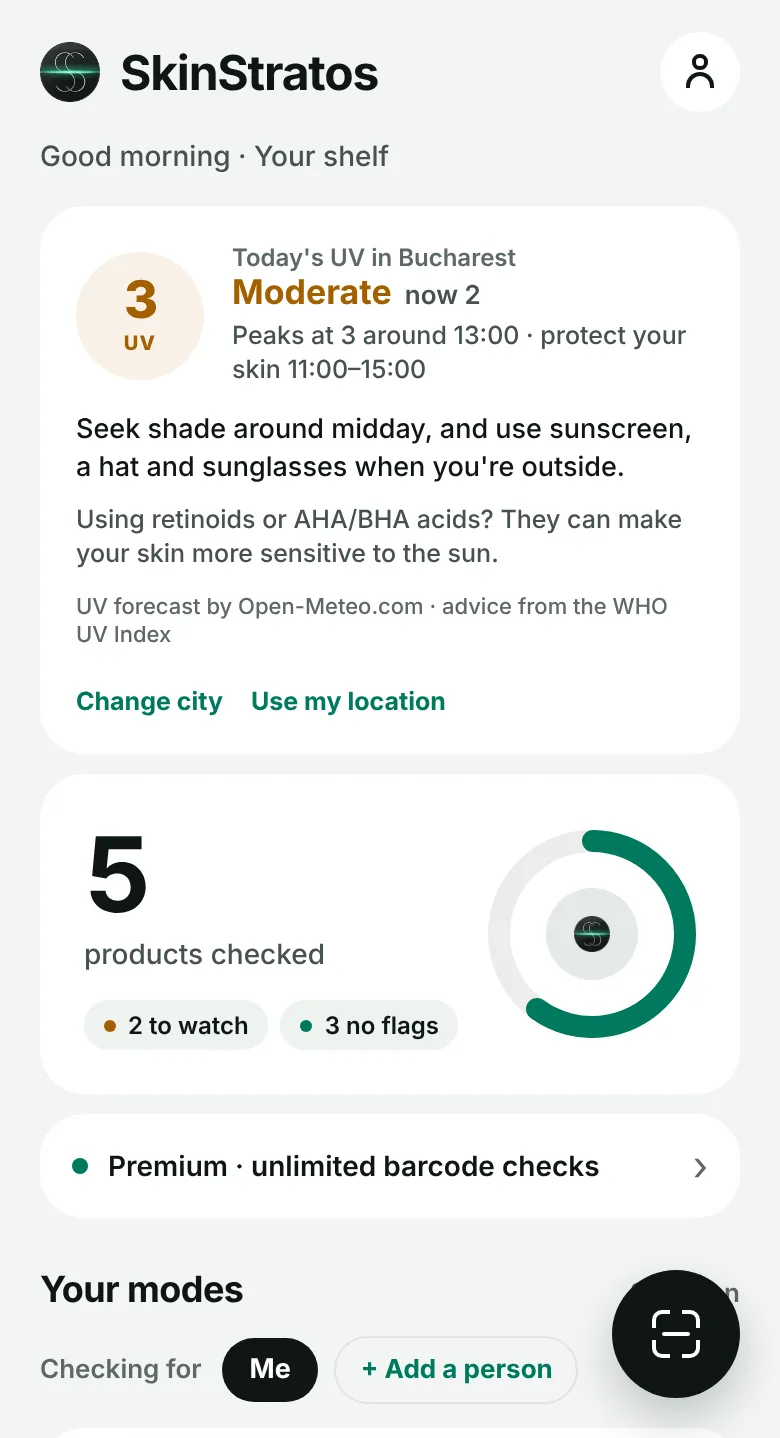
Today’s UV index for your area on the home screen: the level on the World Health Organization’s scale, when it peaks, the hours when sun protection matters, and short advice. After sunset it shows tomorrow’s forecast. The forecast comes from Apple Weather (WeatherKit). It’s information, not medical advice.
Does SkinStratos use my location?
Only if you switch on the UV index and allow it. The app then uses your approximate location, rounded to about 10 km, sends it to our server, which asks Apple Weather for that area’s forecast, and doesn’t save it. If you’d rather not share your location, choose a city instead; it’s saved only on your phone. Details are in section 5 of the privacy policy.
Similar products without these flags
How do you choose the alternatives?
When a product has a red or watch flag, we show products of the same type, from our catalogue of real products whose ingredient lists we’ve checked against the same lists. An alternative must have no red or watch flags for the modes you have on. Those with the fewest notes come first, and fragrance-free ones first when allergy mode is on.
Do you earn money from these links?
Some links may earn us a commission when you buy, at no extra cost to you. They’re marked in the app, and commission never changes which alternatives you see or their order.
Which countries have similar products?
We know shops in 16 countries so far, including Romania, the UK, Germany, Italy, Poland, Sweden and the US, and we add more regularly. The app works out which country your phone is in and suggests similar products from shops that deliver there first, then from shops elsewhere; every shop link says whether it delivers to you. To change this, open Account › Favourite shops › Where you shop and pick your country only, the whole EU, worldwide or another country. The flags themselves work everywhere. Brand names belong to their owners; SkinStratos isn’t affiliated with them.
Account & data
Do I need to give you my name or email?
We never ask for your name. We do ask for your email before your first product check, and confirm it with a 6-digit code: it keeps your scans, settings and Premium if you change phones, and stops the free checks being abused with throw-away accounts. News and offers by email are optional and off unless you tick that box; you can turn them off any time in Account.
What do you do with my data?
We use it only to run the app. We don’t show ads, don’t sell data and don’t use tracking tools. Everything is explained in our Privacy Policy.
How do I delete my account?
In the app: tap the person icon at the top right, then Delete account. Everything is deleted straight away. Other options are on the account deletion page.
Is SkinStratos for children?
No, it’s for people aged 16 and over. The app asks you to confirm this, and to accept the Terms, the first time you open it.
About us
Who makes SkinStratos?
SkinStratos is made in Romania and operated by HAPPY COMFORT CLEANING SRL (CUI 35173276). We built it because ingredient lists are hard to read, and the official lists that explain them are scattered across EU and US agencies. SkinStratos brings them together, in plain words, with the source for every flag.
When does the app launch?
On Google Play and the App Store in early 2027. Want to try it before then? Ask for early access and tell us which phone you use.
How do I contact you?
- Help with the app: support@skinstratos.com
- Privacy and your data: privacy@skinstratos.com
- Partnerships, press and everything else: hello@skinstratos.com
Still stuck?
Write to us and tell us what happened. A real person reads every message.
Email support@skinstratos.com